
A Standard Operating Procedure (SOP’s) is a set of step-by-step instructions compiled by an organization to help workers carry out complex routine operations. Sometimes, these SOP’s describe emergency procedures for dealing with fire, gas leaks, hazardous material spills, or other disasters.
Recently, I worked with a client in the oil and gas industry who had numerous buildings scattered across a large geographical area. Before introducing Office 365, the main office would print out all the Standard Operating Procedures periodically, collate them in a binder, and deliver them to all the locations.
To modernize this process, I utilized SharePoint Online and Power Automate. The idea was that SOP documents would be published anywhere within the SharePoint environment. As long as they were assigned the SOP content type, then they would be captured in the process.
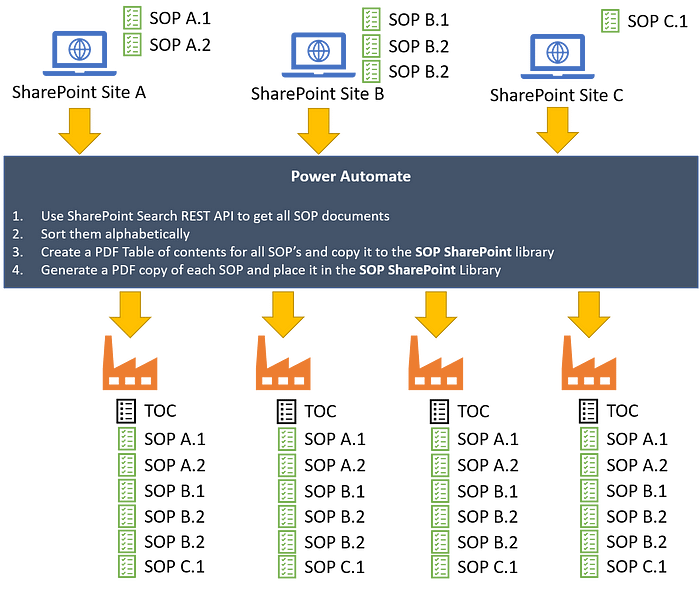
For the new solution to work, all that the SOP publisher needed to do was to create or update their SOP’s, check them in and publish them (assuming that publishing and check-in/out was enabled on the SharePoint libraries), and ensure that the account that is running the specific flow had access to read the files in that SharePoint library.
A Power Automate flow was set up to run on a nightly schedule. The first step it did was search ran every night, which performed the following tasks:
- Search for all documents that have the SOP content type across all SharePoint sites and return the name, path, and ID properties of the document. These properties were needed for the second.
- Iterate through the list of documents returned and for each document. For each document, the flow made a copy of the original document and generated a PDF equivalent in the SOP library in a specific SharePoint site. Then, an entry was added to the table of contents with a link to the relative location within the same folder.
Each building had a local computer that was connected to the internet. An account was logged into the computer that had read permissions to the SOP library and was syncing it locally. If the network ever went down, then the SOP’s available at each building would be as new as the last sync the night before.
Originally published on Medium

 Haniel Croitoru