
Microsoft Data Gateways are a key component of the Power Platform that enables users to integrate their apps, workflow, and BI dashboards with on-premises services and applications.

These gateways are an integral part in many organizations for business productivity. Since they are used to access and update data, they need to be carefully governed to ensure that they are used appropriately.
Gateway Information to Assess
When performing a Power Platform assessment, the gateways that are installed by users need to be reviewed. Some of the key information to determine are:
- Who owns the gateway?
- Who has access to use it?
- Where is it installed?
- Is it online?
- Is it part of a gateway cluster or working on its own?
- Where is the gateway used?
Items 1–5 can be determined from the Power Platform Admin Center. Navigate to https://admin.powerplatform.microsoft.com and select Data (preview) from the left-hand navigation.
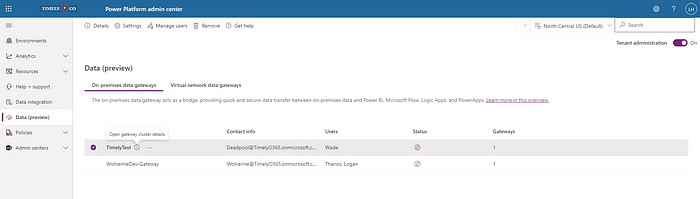
All On-premises data gateways in the tenant will be shown you can see from the list the name, contact info (i.e. owner), users who have access and number of gateways in the cluster. Clicking the Status icon will determine to connect to it and either display Online or Offline next to it. Clicking the Details link in the top navigation or (i) icon next to a gateway name will open up the Details panel on the right, which will additionally show on which device the gateway is installed, the version, and whether it’s enabled or not.

Determining Gateway Usage
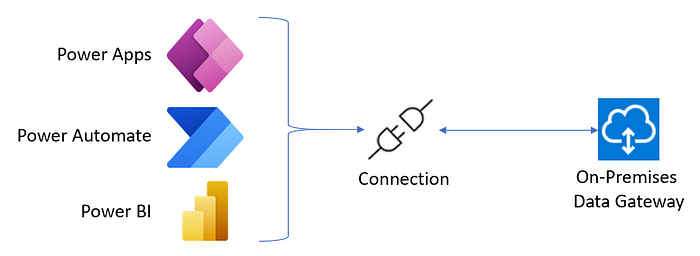
Currently, there is no built-in way to know where a gateway is used. In order to determine what is accessing a gateway requires three pieces of information: gateway details, connection details, and flow and app details. Flows and apps use connections to access the various services. In turn, connections are configured to connect to cloud or on-premise version of their services.
Gateway Details
The Power Platform Admin Center currently has no export feature to get the list of gateways into Excel or some other reusable data. While the information provided is useful, there are pieces of information that are missing which are important for this assessment, such as the GatewayID. This information can be retrieved using the DataGateway PowerShell module (note, it requires PowerShell 7 to run).
Connection Details
Connection details can be retrieved for an environment using the Get-AdminPowerAppConnection cmdlet from the Microsoft.PowerApps.Administration.PowerShell PowerShell module or in a Power Automate flow using the Get Connections as Admin action from the Power Apps for Admins connector.
Flow and App Details
Similar to the connections, Flows and Apps details can be retrieved for an environment using the Get-AdminFlow and Get-AdminApp cmdlets from the Microsoft.PowerApps.Administration.PowerShell PowerShell module or in a Power Automate flow using the List Flows as Admin and Get Apps as Admin actions from the Power Automate for Admins and Power Apps for Admins connectors.
Considerations for Gateway Clean-up
There are a few key considerations that should be taken into account during an on-premises gateway:
First, Communicate
As with any other change made to users, clear communications should be sent out to users of a gateway so they understand its implications. Keep in mind that there may be users impacted by a gateway even if they don’t access it directly (as is the case of a workflow running on a service account at night or a Power BI dashboard that accesses various data sources).
Minimize Impact
There is an option to disable gateways so they cannot be accessed. It is recommended to first disable gateways for a period of time before removing them. This gives users an opportunity to assess the impact of removing a gateway.
Gateway Location
Gateways that are intended to be used by multiple users should be installed on a machine that will not be turned off, such as a laptop. Ideally, the gateways should be located on physical servers or virtual machines. When possible, gateways should not be installed on machines that serve other high computational or data transfer applications, such as a database server to avoid bottlenecks. Furthermore, if a gateway connects to multiple data sources, then it will not be affected by one of the data sources going down.
Gateway Clustering
If a gateway is intended to serve mission-critical workloads, then it would be best to cluster a number of gateways that run on separate machines. This way, if one of the gateways happens to go down, requests will be re-routed to one of the other gateways in the cluster, hence minimizing the impact to the business.
Alternatively…
If you prefer to use a ready-made tool, feel free to download my On-Premise Gateway Audit tool from GitHub.
Originally published on Medium

 Haniel Croitoru