
Recently, Microsoft released an important enhancement to Power Apps that enables Teams to pass important content information directly into the app when calling it. This means that when an app is added to a team or channel, it can leverage this information to simplify the user experience for the user.
Suppose you want to have an app that is used to send information to all users of a channel. In the past, you would have to ask the user to select the Team and channel and then act on this information.
With the most recent enhancements, there are 13 parameters that you can query inside an app:
- source
- locale
- channelId
- channelType
- chatId
- groupId
- hostClientType
- isFullScreen
- subEntityId
- teamId
- teamType
- theme
- userTeamRole
To test it out, I created a simple app that accessed each of these parameter values using the Param() function and displayed the value. You can also see how this information can be leveraged to display Team and channel-specific information, such as the names, and other information.
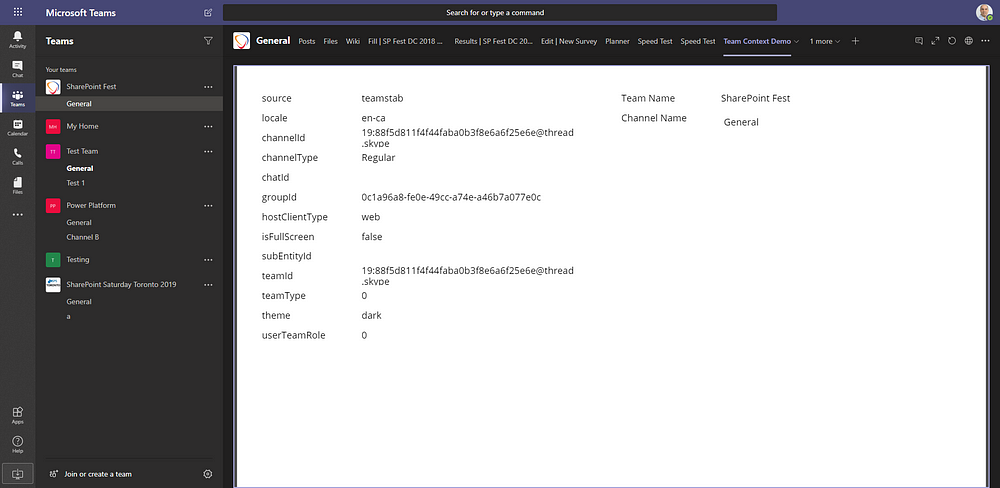
To further leverage the Teams context, the app can pass these values to a Power Automate flow for further processing. As you can see in the images below, the ID’s of the group and channel match those shown inside the app on the screen.


While this is a great improvement for Power Apps, you need to keep in mind that since these context variables are passed in during load time of the app, changes to these context variables are not reflected in the app after it has been loaded. To see the new values, the app will need to be reloaded.

 Haniel Croitoru