
Microsoft Ignite 2019 was another big eye opener this year. Like previous years, there were a ton of new products and features announced. The Power Platform has seen its share of its own improvements to further enhance its functionality and open doors to better integrations and solve business problems.
Since the initial roll-out in 2018, there has been a huge uptake of the Power Platform products in the market — Power Apps, Power Automate (just renamed from Microsoft Flow), and Power BI. Last week, we learned about two new technologies that were added to the Power Platform.
Power Virtual Agents
At the event, Microsoft announced the addition of the Microsoft Power Virtual Agents, a no-code chat bot builder. Microsoft Power Virtual Agents leverages Azure’s AI bot building technologies to enable citizen developers to create their own bots without needing to venture into the Azure space.
Virtual Agents are built from topics and a workflow canvas. The topic constitutes a number of phrases that would trigger a specific agent. At a minimum, 5–10 phrases should be added per topic, but you can include dozens. The more varieties are provided, the better change that the virtual agent will be able to map the phrase to a specific topic.

In the authoring canvas, users are able to create workflows that resemble the Power Automate flows in structure. The trigger is always a phrase entered by the user. Downstream from the trigger are actions that are performed either by the bot or the user. Virtual agents are very extensible by being able to call other virtual agents and flows. While in the user interface, the Virtual Agent builder can interact with the bot on the left-hand side of the screen. When interacting with it, the agent accesses all the topics in an attempt to provide the most accurate answer.
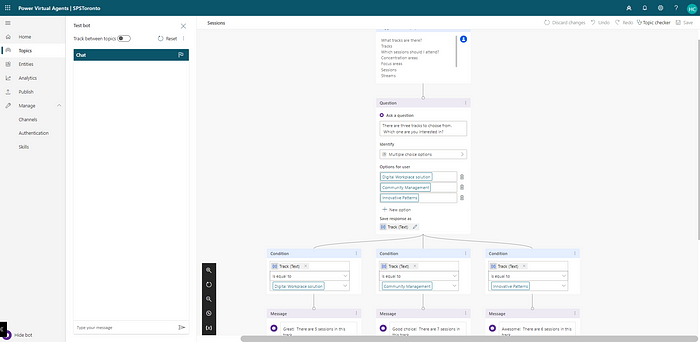
Once the bot is complete, it can be deployed to a website in the form of an IFRAME. When the bot is used, it’s often useful to gather analytics around its accuracy, customer satisfaction, and who in the organization is building bots. The Analytics dashboard provides a 7-day and 30-day summary as shown below.

Like Power Automate flows, Virtual Agents can be customized and extended in functionality by moving the bot to Azure resources.
UI Flows
Another great addition to the Power Platform is UI Flow (still in preview), which is provides robotic process automation to automate UI-based processes. Robotic process automation is commonly used by organizations that need to interface with legacy systems that have no API available to rely on. UI Flow enhances the existing wide range functionality of Power Automate by providing a no-code option to automate manual tasks performed by users.
UI Flow enables users to automate manual tasks based on their desktop or browser.
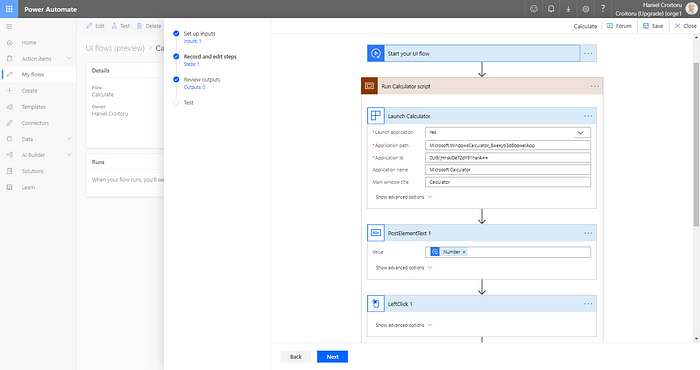
For desktop applications, the user defines a set of actions and provides sample data. When the user actions are recorded, the inputs defined earlier can be used to make the UI flows more dynamic. UI flows can receive inputs from a flow and pass information back to them making the whole end-to-end workflow process much more powerful.
Though new, the Virtual Agent and UI Flows are promising and expand the exiting vast functionality available in the Power Platform. I’m definitely looking forward to 2020 to see how these two tools will get adopted and expand in functionality.
Originally published on Medium

 Haniel Croitoru